Compose your own accordion with the provided components (Action, Icon, Tags) or use your own:
Use the Tags component to display tags in the accordion header.
The Accordion sub-components serve different usage, but they come with restriction. For example, to use the accordion with composed actions, or with tags, you'll have to use the right wrappers because they work together to create the accordion's responsive behaviors.
How to use them
In it's most simple form, the accordion's layout looks like this: 
If you want to compose actions, icons, or your own components, you have to use the Accordion.HeaderWrapper component. It will ensure that the accordion's responsive behaviors work as expected, and that the layout is consistent across all use cases. 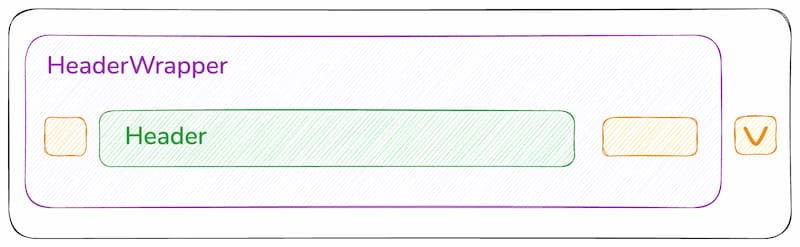
Here's ow it behaves on a small screen: 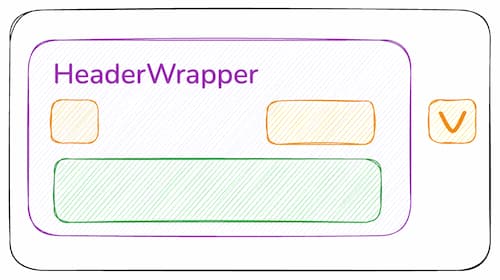
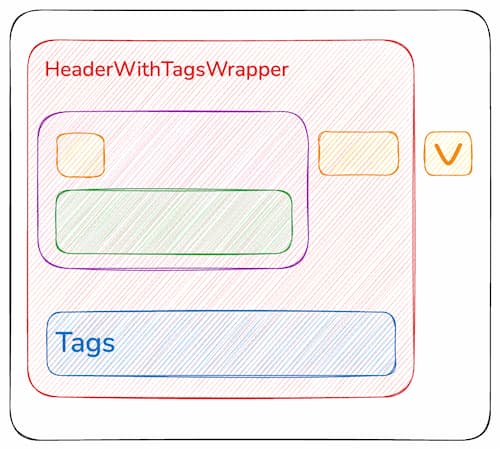
For the tags, we use two additional wrappers: Accordion.HeaderWithTagsWrapper and Accordion.HeaderWithTags. They serve the same purpose as before, but they also ensure that the tags are wrapped correctly while the right actions stays aligned with the arrow button. 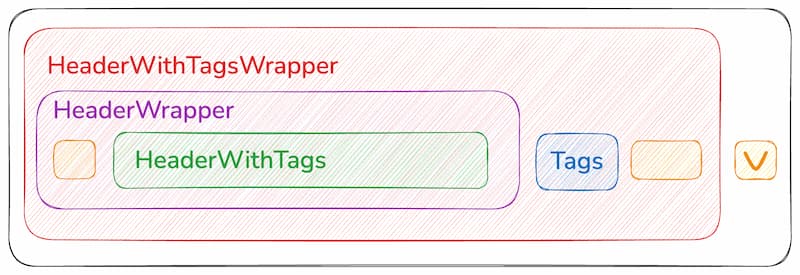
Size prop will propagate to the accordion components: actions, icons, title, etc.
Size propagation with composition:
Add defaultOpen options to useAccordion to open the accordion at the start.
We use useDisclosureStore from Ariakit Disclosure for the state of the accordion, with the animated flag set to true by default.
Pass options to useAccordion:
- defaultOpen:
const accordion = useAccordion({ defaultOpen: true })
The hook returns (among other things):
- useState('open'): whether the accordion is currently open
- hide: a function to hide the accordion